
CHAPTER 6
Flow of Control
6.1 Introduction
In Figure 6.1, we see a bus carrying the children to school. There is only one way to reach the school. The driver has no choice, but to follow the road one milestone after another to reach the school. We learnt in Chapter 5 that this is the concept of sequence, where Python executes one statement after another from beginning to the end of the program. These are the kind of programs we have been writing till now.
“Don't you hate code that's not properly indented? Making it [indenting] part of the syntax guarantees that all code is properly indented.”
– G. van Rossum
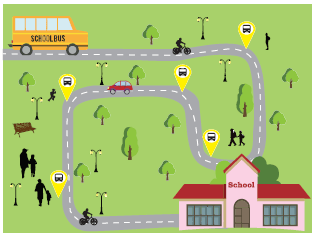
Figure 6.1: Bus carrying students to school
Let us consider a program 6-1 that executes in sequence, that is, statements are executed in an order in which they are written.
In this chapter
» Introduction to Flow of Control
» Selection
» Indentation
» Repetition
» Break and Continue Statements
» Nested Loops

Program 6-1 Program to print the difference of two numbers.
6.2 Selection
Now suppose we have `10 to buy a pen. On visiting the stationery shop, there are a variety of pens priced at `10 each. Here, we have to decide which pen to buy. Similarly, when we use the direction services of a digital map, to reach from one place to another, we notice that sometimes it shows more than one path like the least crowded path, shortest distance path, etc. We decide the path as per our priority. A decision involves selecting from one of the two or more possible options. In programming, this concept of decision making or selection is implemented with the help of if..else statement.
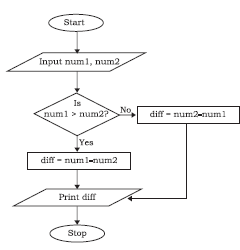
Figure 6.2: Flow chart depicting decision making
Now, suppose we want to display the positive difference of the two numbers num1 and num2 given at program 6-1. For that, we need to modify our approach. Look at the flowchart shown in Figure 6.2 that subtracts the smaller number from the bigger number so that we always get a positive difference. This selection is based upon the values that are input for the two numbers num1 and num2.
The syntax of if statement is:
if condition:
statement(s)
In the following example, if the age entered by the user is greater than 18, then print that the user is eligible to vote. If the condition is true, then the indented statement(s) are executed. The indentation implies that its execution is dependent on the condition. There is no limit on the number of statements that can appear as a block under the if statement.
Example 6.1
age = int(input("Enter your age "))
if age >= 18:
print("Eligible to vote")
A variant of if statement called if..else statement allows us to write two alternative paths and the control condition determines which path gets executed. The syntax for if..else statement is as follows.
if condition:
statement(s)
else:
statement(s)
Let us now modify the example on voting with the condition that if the age entered by the user is greater than 18, then to display that the user is eligible to vote. Otherwise display that the user is not eligible to vote.
age = int(input("Enter your age: "))
if age >= 18:
print("Eligible to vote")
else:
print("Not eligible to vote")
Now let us use the same concept to modify program 6-1, so that it always gives a positive difference as the output. From the flow chart in Figure 6.2, it is clear that we need to decide whether num1 > num2 or not and take action accordingly.
We have to specify two blocks of statements since num1 can be greater than num2 or vice-versa as shown in program 6-2.
Many a times there are situations that require multiple conditions to be checked and it may lead to many alternatives. In such cases we can chain the conditions using if..elif (elif means else..if)
Program 6-2 Program to print the positive difference of two numbers.
#Program 6-2
#Program to print the positive difference of two numbers
num1 = int(input("Enter first number: "))
num2 = int(input("Enter second number: "))
if num1 > num2:
diff = num1 - num2
else:
diff = num2 - num1
print("The difference of",num1,"and",num2,"is",diff)
Output:
Enter first number: 5
Enter second number: 6
The difference of 5 and 6 is 1
The syntax for a selection structure using elif is as shown below.
if condition:
statement(s)
elif condition:
statement(s)
elif condition:
statement(s)
else:
statement(s)
Example 6.2 Check whether a number is positive, negative, or zero.
number = int(input("Enter a number: ")
if number > 0:
print("Number is positive")
elif number < 0:
print("Number is negative")
else:
print("Number is zero")
Example 6.3 Display the appropriate message as per the colour of signal at the road crossing.
signal = input("Enter the colour: ")
if signal == "red" or signal == "RED":
print("STOP")
elif signal == "box1" or signal == "box1":
print("Be Slow")
elif signal == "green" or signal == "GREEN":
print("Go!")
Number of elif is dependent on the number of conditions to be checked. If the first condition is false, then the next condition is checked, and so on. If one of the conditions is true, then the corresponding indented block executes, and the if statement terminates.
Let us write a program to create a simple calculator to perform basic arithmetic operations on two numbers. The program should do the following:
• Accept two numbers from the user.
• Ask user to input any of the operator (+, -, *, /).
An error message is displayed if the user enters anything else.
• Display only positive difference in case of the operator "-".
• Display a message “Please enter a value other than 0” if the user enters the second number as 0 and operator ‘/’ is entered.
Program 6-3 Write a program to create a simple calculator performing only four basic operations.
#Program to create a four function calculator
result = 0
val1 = float(input("Enter value 1: "))
val2 = float(input("Enter value 2: "))
op = input("Enter any one of the operator (+,-,*,/): ")
if op == "+":
result = val1 + val2
elif op == "-":
if val1 > val2:
result = val1 - val2
else:
result = val2 - val1
elif op == "*":
result = val1 * val2
elif op == "/":
if val2 == 0:
print("Error! Division by zero is not allowed. Program terminated")
else:
result = val1/val2
else:
print("Wrong input,program terminated")
print("The result is ",result)
Output:
Enter value 1: 84
Enter value 2: 4
Enter any one of the operator (+,-,*,/): /
The result is 21.0
In the program, for the operators "-" and "/", there exists an if..else condition within the elif block. This is called nested if. We can have many levels of nesting inside if..else statements.
6.3 Indentation
In most programming languages, the statements within a block are put inside curly brackets. However, Python uses indentation for block as well as for nested block structures. Leading whitespace (spaces and tabs) at the beginning of a statement is called indentation. In Python, the same level of indentation associates statements into a single block of code. The interpreter checks indentation levels very strictly and throws up syntax errors if indentation is not correct. It is a common practice to use a single tab for each level of indentation.
In the program 6-4, the if-else statement has two blocks of statements and the statements in each block are indented with the same amount of spaces or tabs.
Program 6-4 Program to find the larger of the two pre-specified numbers.
#Program 6-4
#Program to find larger of the two numbers
num1 = 5
num2 = 6
if num1 > num2: #Block1
print("first number is larger")
print("Bye")
else: #Block2
print("second number is larger")
print("Bye Bye")
Output:
second number is larger
Bye Bye
6.4 Repetition
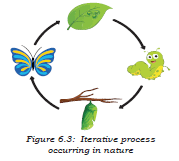
Often, we repeat a tasks, for example, payment of electricity bill, which is done every month. Figure 6.3 shows the life cycle of butterfly that involves four stages, i.e., a butterfly lays eggs, turns into a caterpillar, becomes a pupa, and finally matures as a butterfly. The cycle starts again with laying of eggs by the butterfly.
This kind of repetition is also called iteration. Repetition of a set of statements in a program is made possible using looping constructs. To understand further, let us look at the program 6-5
Program 6-5 Write a program to print the first five natural numbers.
#Program 6-5
#Print first five natural numbers
print(1)
print(2)
print(3)
print(4)
print(5)
Output:
1
2
3
4
5
What should we do if we are asked to print the first 100,000 natural numbers? Writing 100,000 print statements would not be an efficient solution. It would be tedious and not the best way to do the task. Writing a program having a loop or repetition is a better solution. The program logic is given below:
1. Take a variable, say count, and set its value to 1.
2. Print the value of count.
3. Increment the variable (count += 1).
4. Repeat steps 2 and 3 as long as count has a value
less than or equal to 100,000 (count <= 100,000).
Looping constructs provide the facility to execute a set of statements in a program repetitively, based on a condition. The statements in a loop are executed again and again as long as particular logical condition remains true. This condition is checked based on the value of a variable called the loop’s control variable. When the condition becomes false, the loop terminates. It is the responsibility of the programmer to ensure that this condition eventually does become false so that there is an exit condition and it does not become an infinite loop. For example, if we did not set the condition count <= 100000, the program would have never stopped. There are two looping constructs in Python - for and while.
6.4.1 The ‘For’ Loop
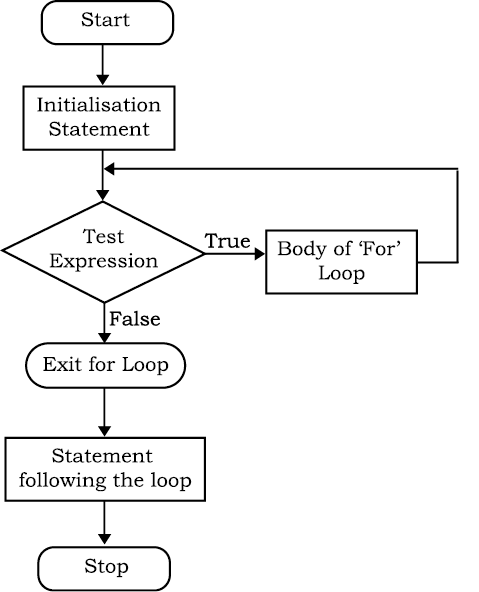
Figure 6.4: Flow chart of for loop
The for statement is used to iterate over a range of values or a sequence. The for loop is executed for each of the items in the range. These values can be either numeric, or, as we shall see in later chapters, they can be elements of a data type like a string, list, or tuple.
With every iteration of the loop, the control variable checks whether each of the values in the range have been traversed or not. When all the items in the range are exhausted, the statements within loop are not executed; the control is then transferred to the statement immediately following the for loop. While using for loop, it is known in advance the number of times the loop will execute. The flowchart depicting the execution of a for loop is given in Figure 6.4.
(A) Syntax of the For Loop
for <control-variable> in <sequence/items in range>:
<statements inside body of the loop>
Program 6-6 Program to print the characters in the string ‘PYTHON’ using for loop.
#Program 6-6
#Print the characters in word PYTHON using for loop
for letter in 'PYTHON':
print(letter)
Output:
P
Y
T
H
O
N
Program 6-7 Program to print the numbers in a given sequence using for loop.
#Program 6-7
#Print the given sequence of numbers using for loop
count = [10,20,30,40,50]
for num in count:
print(num)
Output:
10
20
30
40
50
Program 6-8 Program to print even numbers in a given sequence using for loop.
#Program 6-8
#Print even numbers in the given sequence
numbers = [1,2,3,4,5,6,7,8,9,10]
for num in numbers:
if (num % 2) == 0:
print(num,'is an even Number')
Output:
2 is an even Number
4 is an even Number
6 is an even Number
8 is an even Number
10 is an even Number
Note: Body of the loop is indented with respect to the for statement.
(B) The Range() Function
The range() is a built-in function in Python. Syntax of range() function is:
range([start], stop[, step])
It is used to create a list containing a sequence of integers from the given start value upto stop value (excluding stop value), with a difference of the given step value. We will learn about functions in the next chapter. To begin with, simply remember that function takes parameters to work on. In function range(), start, stop and step are parameters.
The start and step parameters are optional. If start value is not specified, by default the list starts from 0. If step is also not specified, by default the value increases by 1 in each iteration. All parameters of range() function must be integers. The step parameter can be a positive or a negative integer excluding zero.
Example 6.4
#start and step not specified
#start and step not specified
>>> list(range(10))
[0, 1, 2, 3, 4, 5, 6, 7, 8, 9]
#default step value is 1
>>> list(range(2, 10))
[2, 3, 4, 5, 6, 7, 8, 9]
#step value is 5
>>> list(range(0, 30, 5))
[0, 5, 10, 15, 20, 25]
#step value is -1. Hence, decreasing
#sequence is generated
>>> list (range (0, -9, -1))
[0, -1, -2, -3, -4, -5, -6, -7, -8]
The function range() is often used in for loops for generating a sequence of numbers.
Program 6-9 Program to print the multiples of 10 for numbers in a given range.
#Program 6-9
#Print multiples of 10 for numbers in a given range
for num in range(5):
if num > 0:
print(num * 10)
Output:
10
20
30
40
6.4.2 The ‘While’ Loop
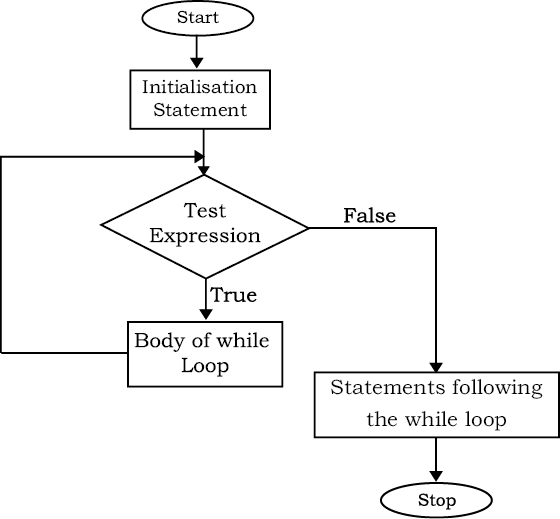
Figure 6.5: Flow chart of while Loop
The statements within the body of the while loop must ensure that the condition eventually becomes false; otherwise the loop will become an infinite loop, leading to a logical error in the program. The flowchart of while loop is shown in Figure 6.5.
Syntax of while Loop
while test_condition:
body of while
Program 6-10 Program to print first 5 natural numbers using while loop.
#Program 6-10
#Print first 5 natural numbers using while loop
count = 1
while count <= 5:
print(count)
count += 1
Output:
1
2
3
4
5
Program 6-11 Program to find the factors of a whole number using while loop.
#Program 6-11
#Find the factors of a number using while loop
num = int(input("Enter a number to find its factor: "))
print (1, end=' ') #1 is a factor of every number
factor = 2
while factor <= num/2 :
if num % factor == 0:
#the optional parameter end of print function specifies the delimeter #blank space(' ') to print next value on same line
print(factor, end=' ')
factor += 1
print (num, end=' ') #every number is a factor of itself
Output:
Enter a number to find its factors : 6
1 2 3 6
Note: Body of the loop is indented with respect to the while statement. Similarly, the statements within if are indented with respect to positioning of if statement.
6.5 Break and Continue Statement
Looping constructs allow programmers to repeat tasks efficiently. In certain situations, when some particular condition occurs, we may want to exit from a loop (come out of the loop forever) or skip some statements of the loop before continuing further in the loop. These requirements can be achieved by using break and continue statements, respectively. Python provides these statements as a tool to give more flexibility to the programmer to control the flow of execution of a program.
6.5.1 Break Statement
The break statement alters the normal flow of execution as it terminates the current loop and resumes execution of the statement following that loop.
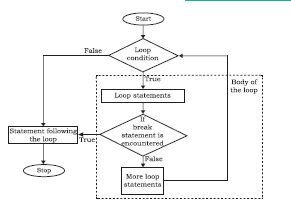
Figure 6.5: Flowchart for using break statement in loop
Program 6-12 Program to demonstrate use of break statement.
#Program 6-12
#Program to demonstrate the use of break statement in loop
num = 0
for num in range(10):
num = num + 1
if num == 8:
break
print('Num has value ' + str(num))
print('Encountered break!! Out of loop')
Output:
Num has value 1
Num has value 2
Num has value 3
Num has value 4
Num has value 5
Num has value 6
Num has value 7
Encountered break!! Out of loop
Program 6-13 Find the sum of all the positive numbers entered by the user. As soon as the user enters a neagtive number, stop taking in any further input from the user and display the sum .
Program 6-14 Program to check if the input number is prime or not.
6.5.2 Continue Statement
When a continue statement is encountered, the control skips the execution of remaining statements inside the body of the loop for the current iteration and jumps to the beginning of the loop for the next iteration. If the loop’s condition is still true, the loop is entered again, else the control is transferred to the statement immediately following the loop.Figure 6.7 shows the flowchart of continue statement.
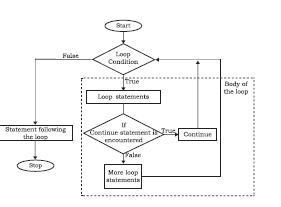
Figure 6.6: Flow chart of continue statement
Program 6-15 Program to demonstrate the use of continue statement.
#Program 6-15
#Prints values from 0 to 6 except 3
num = 0
for num in range(6):
num = num + 1
if num == 3:
continue
print('Num has value ' + str(num))
print('End of loop')
Output:
Num has value 1
Num has value 2
Num has value 4
Num has value 5
Num has value 6
End of loop
Observe that the value 3 is not printed in the output, but the loop continues after the continue statement to print other values till the for loop terminates.
6.6 Nested Loops
A loop may contain another loop inside it. A loop inside another loop is called a nested loop.
Program 6-16 Program to demonstrate working of nested for loops.
#Program 6-16
#Demonstrate working of nested for loops
for var1 in range(3):
print( "Iteration " + str(var1 + 1) + " of outer loop")
for var2 in range(2): #nested loop
print(var2 + 1)
print("Out of inner loop")
print("Out of outer loop")
Output:
Iteration 1 of outer loop
1
2
Out of inner loop
Iteration 2 of outer loop
1
2
Out of inner loop
Iteration 3 of outer loop
1
2
Out of inner loop
Out of outer loop
Python does not impose any restriction on how many loops can be nested inside a loop or on the levels of nesting. Any type of loop (for/while) may be nested within another loop (for/while).
Program 6-17 Program to print the pattern for a number
input by the user.
#Program 6-17
#Program to print the pattern for a number input by the user
#The output pattern to be generated is
#1
#1 2
#1 2 3
#1 2 3 4
#1 2 3 4 5
num = int(input("Enter a number to generate its pattern = "))
for i in range(1,num + 1):
for j in range(1,i + 1):
print(j, end = " ")
print()
Output:
Enter a number to generate its pattern = 5
1
1 2
1 2 3
1 2 3 4
1 2 3 4 5
Program 6-18 Program to find prime numbers between 2 to 50 using nested for loops.
#Program 6-18
num = 2
for i in range(2, 50):
j= 2
while ( j <= (i/2)):
if (i % j == 0): #factor found
break #break out of while loop
j += 1
if ( j > i/j) : #no factor found
print ( i, "is a prime number")
print ("Bye Bye!!")
Output:
2 is a prime number
3 is a prime number
5 is a prime number
7 is a prime number
11 is a prime number
13 is a prime number
17 is a prime number
19 is a prime number
23 is a prime number
29 is a prime number
31 is a prime number
37 is a prime number
41 is a prime number
43 is a prime number
47 is a prime number
Bye Bye!!
Program 6-19 Write a program to calculate the factorial of a given number.
#Program 6-19
#The following program uses a for loop nested inside an if..else #block to calculate the factorial of a given number
num = int(input("Enter a number: "))
fact = 1
# check if the number is negative, positive or zero
if num < 0:
print("Sorry, factorial does not exist for negative numbers")
elif num == 0:
print("The factorial of 0 is 1")
else:
for i in range(1, num + 1):
fact = fact * i
print("factorial of ", num, " is ", fact)
Output:
Enter a number: 5
Factorial of 5 is 120
Summary
• The if statement is used for selection or decision making.
• The looping constructs while and for allow sections of code to be executed repeatedly under some condition.
• for statement iterates over a range of values or a sequence.
• The statements within the body of for loop are executed till the range of values is exhausted.
• The statements within the body of a while are executed over and over until the condition of the while is false.
• If the condition of the while loop is initially false, the body is not executed even once.
• The statements within the body of the while loop must ensure that the condition eventually becomes false; otherwise, the loop will become an infinite loop, leading to a logical error in the program.
• The break statement immediately exits a loop, skipping the rest of the loop’s body. Execution continues with the statement immediately following the body of the loop. When a continue statement is encountered, the control jumps to the beginning of the loop for the next iteration.
• A loop contained within another loop is called a nested loop.
Exercise
1. What is the difference between else and elif construct of if statement?
2. What is the purpose of range() function? Give one example.
3. Differentiate between break and continue statements using examples.
4. What is an infinite loop? Give one example.
5. Find the output of the following program segments:
(i)
a = 110
while a > 100:
print(a)
a -= 2
(ii)
for i in range(20,30,2):
print(i)
(iii)
country = 'INDIA'
for i in country:
print (i)
(iv)
i = 0; sum = 0
while i < 9:
if i % 4 == 0:
sum = sum + i
i = i + 2
print (sum)
(v)
for x in range(1,4):
for y in range(2,5):
if x * y > 10:
break
print (x * y)
(vi)
var = 7
while var > 0:
print ('Current variable value: ', var)
var = var -1
if var == 3:
break
else:
if var == 6:
var = var -1
continue
print ("Good bye!")
Programming Exercises
1. Write a program that takes the name and age of the user as input and displays a message whether the user is eligible to apply for a driving license or not. (the eligible age is 18 years).
2. Write a function to print the table of a given number. The number has to be entered by the user.
3. Write a program that prints minimum and maximum of five numbers entered by the user.
4. Write a program to check if the year entered by the user is a leap year or not.
5. Write a program to generate the sequence: –5, 10, –15, 20, –25….. upto n, where n is an integer input by the user.
6. Write a program to find the sum of 1+ 1/8 + 1/27......1/n3, where n is the number input by the user.
7. Write a program to find the sum of digits of an integer number, input by the user.
8. Write a function that checks whether an input number is a palindrome or not.
[Note: A number or a string is called palindrome if it appears same when written in reverse order also. For example, 12321 is a palindrome while 123421 is not a palindrome]
9. Write a program to print the following patterns:
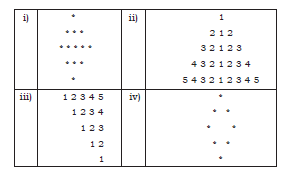
10. Write a program to find the grade of a student when
grades are allocated as given in the table below.
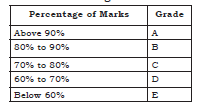
Percentage of the marks obtained by the student is input to the program.
Case Study-based Questions
Let us add more functionality to our SMIS developed in Chapter 5.
6.1 Write a menu driven program that has options to
• accept the marks of the student in five major subjects in Class X and display the same.
• calculate the sum of the marks of all subjects. Divide the total marks by number of subjects (i.e. 5), calculate percentage = total marks/5 and display the percentage.
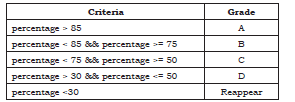
• Find the grade of the student as per the following criteria:
Let’s peer review the case studies of others based on the parameters given under “DOCUMENTATION TIPS” at the end of Chapter 5 and provide a feedback to them.