
Chapter 7
Functions
7.1 Introduction
Till now we have written some programs and might have realised that as the problem gets complex, the number of lines in a program increase, which makes the program look bulky and difficult to manage. Consider the following problem statement:
“Once you succeed in writing the programs for [these] complicated algorithms, they usually run extremely fast. The computer doesn’t need to understand the algorithm, its task is only to run the programs.”
– R. Tarjan
There is a company that manufactures tents as per user’s requirements. The shape of the tent is cylindrical surmounted by a conical top.
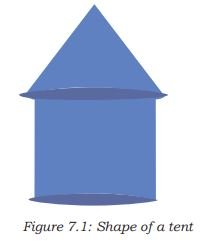
The company performs the following tasks to fix the selling price of each tent.
1. Accept user requirements for the tent, such as
a) height
b) radius
c) slant height of the conical part
2. Calculate the area of the canvas used
3. Calculate the cost of the canvas used for making the tent
4. Calculate the net payable amount by the customer
that is inclusive of the 18% tax
The company has created a computer program for quick and accurate calculation for the payable amount as shown in program 7-1.
In this chapter
» Introduction to Functions
» User Defined Functions
» Scope of a Variable
» Python Standard
Library
Program 7-1 Program to calculate the payable amount
for the tent.
#Program 7-1
#Program to calculate the payable amount for the tent without #functions
print( "Enter values for the cylindrical part of the tent in meters\n")
h = float(input("Enter height of the cylindrical part: "))
r = float(input("Enter radius: "))
l = float(input("Enter the slant height of the conical part in meters: "))
csa_conical = 3.14*r*l #Area of conical part
csa_cylindrical = 2*3.14*r*h #Area of cylindrical part
# Calculate area of the canvas used for making the tent
canvas_area = csa_conical + csa_cylindrical
print("The area of the canvas is",canvas_area,"m^2")
#Calculate cost of the canvas
unit_price = float(input("Enter the cost of 1 m^2 canvas: "))
total_cost= unit_price * canvas_area
print("The total cost of canvas = ",total_cost)
#Add tax to the total cost to calculate net amount payable by the #customer
tax = 0.18 * total_cost;
net_price = total_cost + tax
print("Net amount payable = ",net_price)
Another approach to solve the above problem is to divide the program into different blocks of code as shown in Figure 7.2.
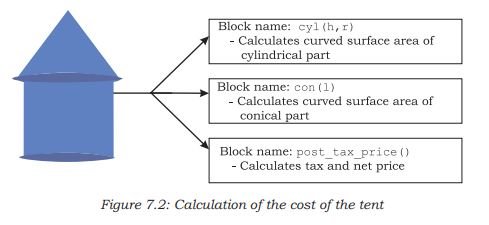
The process of dividing a computer program into separate independent blocks of code or separate
sub-problems with different names and specific functionalities is known as modular programming. In this chapter, we will learn about the benefits of this approach.
7.2 Functions
In programming, the use of function is one of the means to achieve modularity and reusability. Function can be defined as a named group of instructions that accomplish a specific task when it is invoked. Once defined, a function can be called repeatedly from different places of the program without writing all the codes of that function everytime, or it can be called from inside another function, by simply writing the name of the function and passing the required parameters, if any (Section 7.3). The programmer can define as many functions as desired while writing the code. The program 7-1 is rewritten using user defined functions as shown in program 7-2.
Program 7-2 Program to calculate the payable amount for the tent using user defined functions.
#Program 7-2
#Program to calculate the cost of tent
#function definition
def cyl(h,r):
area_cyl = 2*3.14*r*h #Area of cylindrical part
return(area_cyl)
#function definition
def con(l,r):
area_con = 3.14*r*l #Area of conical part
return(area_con)
#function definition
def post_tax_price(cost): #compute payable amount for the tent
tax = 0.18 * cost;
net_price = cost + tax
return(net_price)
print("Enter values of cylindrical part of the tent in meters:")
h = float(input("Height: "))
r = float(input("Radius: "))
csa_cyl = cyl(h,r) #function call
l = float(input("Enter slant height of the conical area in meters: "))
csa_con = con(l,r) #function call
#Calculate area of the canvas used for making the tent
canvas_area = csa_cyl + csa_con
print("Area of canvas = ",canvas_area," m^2")
#Calculate cost of canvas
unit_price = float(input("Enter cost of 1 m^2 canvas in rupees: "))
total_cost = unit_price * canvas_area
print("Total cost of canvas before tax = ",total_cost)
print("Net amount payable (including tax) = ",post_tax_price(total_cost))
If we compare program 7-1 and 7-2, it is evident that program 7-2 looks more organised and easier to read.
7.2.1 The Advantages of Function
Suppose in further the company decides to design another type of tent whose base is rectangular, while the upper part remains the same. In such a scenario, some part of the existing code can be reused by calling the function con(l,r). If the company develops other products or provides services, and where 18% tax rate is to be applied, the programmer can use the function post_tax_price (cost) directly.
Thus, following are the advantages of using functions in a program:
• Increases readability, particularly for longer code as by using functions, the program is better organised and easy to understand.
• Reduces code length as same code is not required to be written at multiple places in a program. This also makes debugging easier.
• Increases reusability, as function can be called from another function or another program. Thus, we can reuse or build upon already defined functions and avoid repetitions of writing the same piece of code.
• Work can be easily divided among team members and completed in parallel.
7.3 User Defined Functions
Taking advantage of reusability feature of functions, there is a large number of functions already available in Python under standard library (section 7.5). We can directly call these functions in our program without defining them. However, in addition to the standard library functions, we can define our own functions while writing the program. Such functions are called user defined functions. Thus, a function defined to achieve some task as per the programmer's requirement is called a user defined function.
7.3.1 Creating User Defined Function
A function definition begins with def (short for define). The syntax for creating a user defined function is as follows:

• The items enclosed in "[ ]" are called parameters and they are optional. Hence, a function may or may not have parameters. Also, a function may or may not return a value.
• Function header always ends with a colon (:).
• Function name should be unique. Rules for naming identifiers also applies for function naming.
• The statements outside the function indentation
are not considered as part of the function.
Program 7-3 Write a user defined function to add 2 numbers and display their sum.
#Program 7-3
#Function to add two numbers
#The requirements are listed below:
#1. We need to accept 2 numbers from the user.
#2. Calculate their sum
#3. Display the sum.
#function definition
def addnum():
fnum = int(input("Enter first number: "))
snum = int(input("Enter second number: "))
sum = fnum + snum
print("The sum of ",fnum,"and ",snum,"is ",sum)
#function call
addnum()
In order to execute the function addnum(), we need to call it. The function can be called in the program by writing function name followed by () as shown in the last line of program 7-3.
Output:
Enter first number: 5
Enter second number: 6
The sum of 5 and 6 is 11
7.3.2 Arguments and Parameters
In the above example, the numbers were accepted from the user within the function itself, but it is also possible for a user defined function to receive values at the time of being called. An argument is a value passed to the function during the function call which is received in corresponding parameter defined in function header.
Program 7-4 Write a program using a user defined function that displays sum of first n natural numbers, where n is passed as an argument.
#Program 7-4
#Program to find the sum of first n natural numbers
#The requirements are:
#1. n be passed as an argument
#2. Calculate sum of first n natural numbers
#3. Display the sum
#function header
def sumSquares(n): #n is the parameter
sum = 0
for i in range(1,n+1):
sum = sum + i
print("The sum of first",n,"natural numbers is: ",sum)
num = int(input("Enter the value for n: "))
#num is an argument referring to the value input by the user
sumSquares(num) #function call
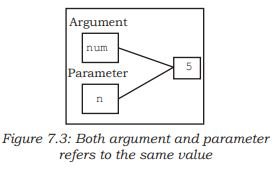
Let us assume that the user has input 5 during the execution of the program 7-4. So, num refers to the value 5. It is then used as an argument in the function:
sumSquares(num)
def sumSquares(n):
where parameter n also refers to the value 5 which num is referring to as shown in Figure 7.3.
Since both num and n are referring to the same value, they are bound to have the same identity. We can use the id() function to find the identity of the object that the argument and parameter are referring to. Let us understand this with the help of the following example.
Program 7-5 Write a program using user defined function that accepts an integer and increments the value by 5. Also display the id of argument (before function call), id of parameter before increment and after increment.
#Program 7-5
#Function to add 5 to a user input number
#The requirements are listed below:
#1. Display the id()of argument before function call.
#2. The function should have one parameter to accept the argument
#3. Display the value and id() of the parameter.
#4. Add 5 to the parameter
#5. Display the new value and id()of the parameter to check
#whether the parameter is assigned a new memory location or
#not.def incrValue(num):
#id of Num before increment
print("Parameter num has value:",num,"\nid =",id(num))
num = num + 5#id of Num after increment
print("num incremented by 5 is",num,"\nNow id is ",id(num))
number = int(input("Enter a number: "))
print("id of argument number is:",id(number)) #id of Number
incrValue(number)
Output:

Let us understand the above output through illustration (see Figure 7.4):
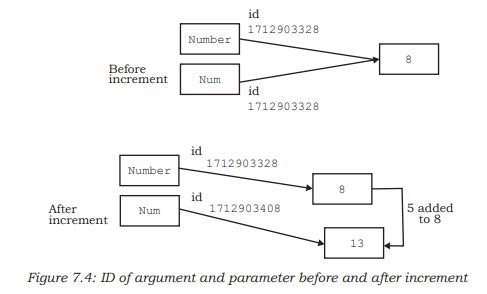
Both argument and parameter can have the same name as shown in program 7-6.
Program 7-6 Write a program using a user defined
function myMean() to calculate the mean
of floating values stored in a list.
#Program 7-6
#Function to calculate mean
#The requirements are listed below:
#1. The function should have 1 parameter (list containing floating #point values)
#2. To calculate mean by adding all the numbers and dividing by
#total number of elementsdef myMean(myList): #function to compute means of values in list
total = 0
count = 0
for i in myList:
total = total + i #Adds each element i to total
count = count + 1 #Counts the number of elements
mean = total/count #mean is calculated
print("The calculated mean is:",mean)
myList = [1.3,2.4,3.5,6.9]
#Function call with list "myList" as an argument
myMean(myList)
Output:
The calculated mean is: 3.5250000000000004
Program 7-7 Write a program using a user defined function calcFact() to calculate and display the factorial of a number num passed as an argument.
#Program 7-7
#Function to calculate factorial
#The requirements are listed below:
#1. The function should accept one integer argument from user.
#2. Calculate factorial. For example:
#3. Display factorial
def calcFact(num):
fact = 1
for i in range(num,0,-1):
fact = fact * i
print("Factorial of",num,"is",fact)
num = int(input("Enter the number: "))
calcFact(num)
Output:
Enter the number: 5
Factorial of 5 is 120
Both argument and parameter can have the same name as shown in program 7-6.
1712903328
1712903408
1712903328
1712903328
Note: Since multiplication is commutative 5! = 5*4*3*2*1 = 1*2*3*4*5
(A) String as Parameters
In programs 7-5 to 7-7, the arguments passed are of numeric type only. However, in some programs, user may need to pass string values as an argument, as shown in program 7-8.
Program 7-8 Write a program using a user defined
function that accepts the first name and
lastname as arguments, concatenate
them to get full name and displays the
output as:
Hello full name
For example, if first name is Gyan and lastname is
Vardhan, the output should be:
Hello Gyan Vardhan
#Program 7-8
#Function to display full name
#The requirements are listed below:
#1. The function should have 2 parameters to accept first name and #last name.
#2. Concatenate names using + operator with a space between first
#name and last name.#3. Display full name.
def fullname(first,last):
#+ operator is used to concatenate strings
fullname = first + " " + last
print("Hello",fullname)
#function ends here
first = input("Enter first name: ")
last = input("Enter last name: ")
#function call
fullname (first,last)
Output:
Enter first name: Gyan
Enter last name: Vardhan
Hello Gyan Vardhan
(B) Default Parameter
Python allows assigning a default value to the parameter. A default value is a value that is predecided and assigned to the parameter when the function call does not have its corresponding argument.
#Program 7-9
#Function to display mixed fraction for an improper fraction
#The requirements are listed below:
#1. Input numerator and denominator from the user.
#2. Check if the entered numerator and denominator form a proper
#fraction.#3. If they do not form a proper fraction, then call
#mixedFraction().#4. mixedFraction()display a mixed fraction only when the fraction
#does not evaluate to a whole number.def mixedFraction(num,deno = 1):
remainder = num % deno
#check if the fraction does not evaluate to a whole number
if remainder!= 0:
quotient = int(num/deno)
print("The mixed fraction=", quotient,"(",remainder, "/", deno,")")
else:
print("The given fraction evaluates to a whole number")
#function ends here
num = int(input("Enter the numerator: "))
deno = int(input("Enter the denominator: "))
print("You entered:",num,"/",deno)
if num > deno: #condition to check whether the fraction is improper
mixedFraction(num,deno) #function call
else:
print("It is a proper fraction")
Output:
Enter the numerator: 17
Enter the denominator: 2
You entered: 17 / 2
The mixed fraction = 8 ( 1 / 2 )
In the above program, the denominator entered is 2, which is passed to the parameter "deno" so the default value of the argument deno is overwritten.
Let us consider the following function call:
mixedFraction(9)
Here, num will be assigned 9 and deno will use the default value 1.
Note:
• A function argument can also be an expression, such as
mixedFraction(num+5,deno+5)
In such a case, the argument is evaluated before calling the function so that a valid value can be assigned to the parameter.
• The parameters should be in the same order as that of the arguments.
The default parameters must be the trailing parameters in the function header that means if any parameter is having default value then all the other parameters to its right must also have default values. For example,
def mixedFraction(num,deno = 1)
def mixedFraction(num = 2,deno = 1)
Let us consider few more function definition headers:
#incorrect as default must be the last
#parameter
def calcInterest(principal = 1000, rate, time = 5):
#correct
def calcInterest(rate,principal = 1000, time = 5):
7.3.3 Functions Returning Value
A function may or may not return a value when called. The return statement returns the values from the function. In the examples given so far, the function performs calculations and display result(s).They do not return any value. Such functions are called void functions. But a situation may arise, wherein we need to send value(s) from the function to its calling function. This is done using return statement.
The return statement does the following:
• returns the control to the calling function.
• return value(s) or None.
Program 7-10 Write a program using user defined
function calcPow() that accepts base
and exponent as arguments and returns
the value Baseexponent where Base and
exponent are integers.
#Program 7-10
#Function to calculate and display base raised to the power exponent
#The requirements are listed below:
#1. Base and exponent are to be accepted as arguments.
#2. Calculate Baseexponent
#3. Return the result (use return statement )
#4. Display the returned value.
def calcpow(number,power): #function definition
result = 1
for i in range(1,power+1):
result = result * number
return result
base = int(input("Enter the value for the Base: "))
expo = int(input("Enter the value for the Exponent: "))
answer = calcpow(base,expo) #function call
print(base,"raised to the power",expo,"is",answer)
Output:
Enter the value for the Base: 5
Enter the value for the Exponent: 4
5 raised to the power 4 is 625
So far we have learnt that a function may or may not have parameter(s) and a function may or may not return any value(s). In Python, as per our requirements, we can have the function in either of the following ways:
• Function with no argument and no return value
• Function with no argument and with return value(s)
• Function with argument(s) and no return value
• Function with argument(s) and return value(s)
7.3.4 Flow of Execution
Flow of execution can be defined as the order in which the statements in a program are executed. The Python interpreter starts executing the instructions in a program from the first statement. The statements are executed one by one, in the order of appearance from top to bottom.
When the interpreter encounters a function definition, the statements inside the function are not executed until the function is called. Later, when the interpreter encounters a function call, there is a little deviation in the flow of execution. In that case, instead of going to the next statement, the control jumps to the called function and executes the statement of that function. After that, the control comes back the point of function call so that the remaining statements in the program can be executed. Therefore, when we read a program, we should not simply read from top to bottom. Instead, we should follow the flow of control or execution. It is also important to note that a function must be defined before its call within a program.
Program 7-11 Program to understand the low of execution using functions.
#Program 7-11
#print using functions
helloPython() #Function Call
def helloPython(): #Function definition
print("I love Programming")
On executing the above code the following error is produced:
Traceback (most recent call last):
File "C:\NCERT\Prog 7-11.py", line 3, in <module>
helloPython() #Function Call
NameError: name 'helloPython' is not defined
The error ‘function not defined’ is produced even though the function has been defined. When a function call is encountered, the control has to jump to the function definition and execute it. In the above program, since the function call precedes the function definition, the interpreter does not find the function definition and hence an error is raised.
That is why, the function definition should be made before the function call as shown below:
def helloPython(): #Function definition
print("I love Programming")
helloPython() #Function Call
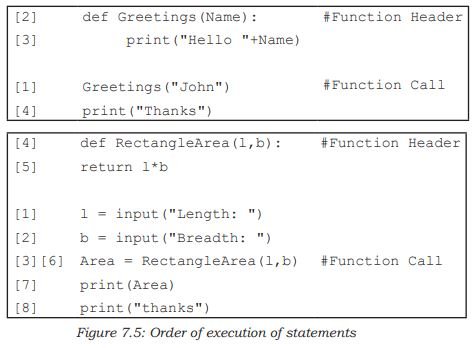
Figure 7.5 explains the flow of execution for two programs. The number in square brackets shows the order of execution of the statements.
Sometime, a function needs to return multiple values which may be returned using tuple. Program 7-12 shows a function which returns two values area and perimeter of rectangle using tuple.
Program 7-12 Write a program using user defined function that accepts length and breadth of a rectangle and returns the area and perimeter of the rectangle
#Program 7-12
#Function to calculate area and perimeter of a rectangle
#The requirements are listed below:
#1. The function should accept 2 parameters.
#2. Calculate area and perimeter.
#3. Return area and perimeter.
def calcAreaPeri(Length,Breadth):
area = length * breadth
perimeter = 2 * (length + breadth)
#a tuple is returned consisting of 2 values area and perimeter
return (area,perimeter)
l = float(input("Enter length of the rectangle: "))
b = float(input("Enter breadth of the rectangle: "))
#value of tuples assigned in order they are returned
area,perimeter = calcAreaPeri(l,b)
print("Area is:",area,"\nPerimeter is:",perimeter)
Output:
Enter Length of the rectangle: 45
Enter Breadth of the rectangle: 66
Area is: 2970.0
Perimeter is: 222.0
Multiple values in through a tuple.(Ch 11) Python are returned
through a tuple. (Ch. 10)
Program 7-13 Write a program that simulates a traffic light . The program should consist of the following:
1. A user defined function trafficLight( ) that accepts input from the user, displays an error message if the user enters anything other than RED, YELLOW, and GREEN. Function light() is called and following is displayed depending upon return value from light().
a) “STOP, your life is precious” if the value returned by light() is 0.
b) “Please WAIT, till the light is Green “ if the value returned by light() is 1
c) “GO! Thank you for being patient” if the value returned by light() is 2.
2. A user defined function light() that accepts a string as input and returns 0 when the input is RED, 1 when the input is YELLOW and 2 when the input is GREEN. The input should be passed as an argument.
3. Display “ SPEED THRILLS BUT KILLS” after the
function trafficLight( ) is executed.
#Program 7-13
#Function to simulate a traffic light
#It is required to make 2 user defined functions trafficLight() and #light().
def trafficLight():
signal = input("Enter the colour of the traffic light: ")
if (signal not in ("RED","YELLOW","GREEN")):
print("Please enter a valid Traffic Light colour in CAPITALS")
else:
value = light(signal) #function call to light()
if (value == 0):
print("STOP, Your Life is Precious.")
elif (value == 1):
print ("PLEASE GO SLOW.")
else:
print("GO!,Thank you for being patient.")
#function ends here
def light(colour):
if (colour == "RED"):
return(0);
elif (colour == "YELLOW"):
return (1)
else:
return(2)
#function ends here
trafficLight()
print("SPEED THRILLS BUT KILLS")
Output:
Enter the colour of the traffic light: YELLOW
PLEASE GO SLOW.
SPEED THRILLS BUT KILLS
7.4 Scope of a Variable
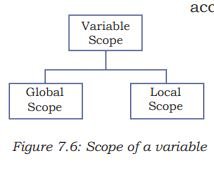
A variable defined inside a function cannot be accessed outside it. Every variable has a well-defined accessibility. The part of the program where a variable is accessible can be defined as the scope of that variable. A variable can have one of the following two scopes:
A variable that has global scope is known as a global variable and a variable that has a local scope is known as a local variable.
(A) Global Variable
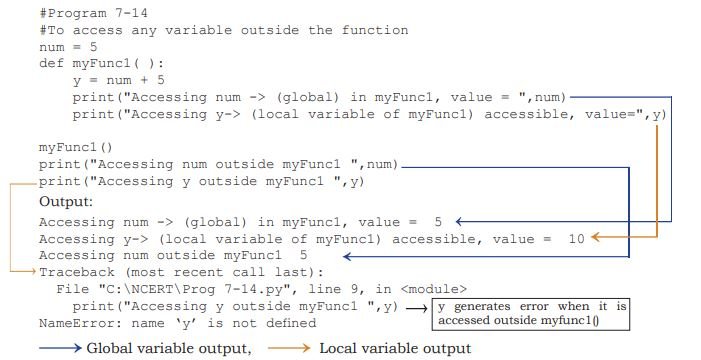
In Python, a variable that is defined outside any function or any block is known as a global variable. It can be accessed in any functions defined onwards. Any change made to the global variable will impact all the functions in the program where that variable can be accessed.
(B) Local Variable
A variable that is defined inside any function or a block is known as a local variable. It can be accessed only in the function or a block where it is defined. It exists only till the function executes.
Note:
• Any modification to global variable is permanent and affects all the functions where it is used.
• If a variable with the same name as the global variable is defined inside a function, then it is considered local to that function and hides the global variable.
• If the modified value of a global variable is to be used
outside the function, then the keyword global should
be prefixed to the variable name in the function.
Program 7-15 Write a program to access any variable outside the function.
#Program 7-15
#To access any variable outside the function
num = 5
def myfunc1():
#Prefixing global informs Python to use the updated global
#variable num outside the functionglobal num
print("Accessing num =",num)
num = 10
print("num reassigned =",num)
#function ends here
myfunc1()
print("Accessing num outside myfunc1",num)
Output:

7.5 Python Standard Library
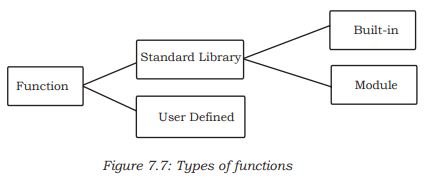
Python has a very extensive standard library. It is a collection of many built in functions that can be called in the program as and when required, thus saving programmer’s time of creating those commonly used functions everytime.
7.5.1 Built-in functions
Built-in functions are the ready-made functions in Python that are frequently used in programs. Let us inspect the following Python program:
#Program to calculate square of a number
a = int(input("Enter a number: ")
b = a * a
print(" The square of ",a ,"is", b)
In the above program input(), int() and print() are the built-in functions. The set of instructions to be executed for these built-in functions are already defined in the python interpreter.
Let us consider the following Python statement consisting of a function call to a built in function and answer the given questions:
fname = input("Enter your name: ")
What is the name of the function being used?
• input()
Does the function accept a value or argument?
• Yes, because the parenthesis "()" consists of a string "Enter your name".
Does the function return a value?
Hence, the function input() accepts a value and returns a value.
Now consider the built-in functions int() and print(), and answer the questions below:
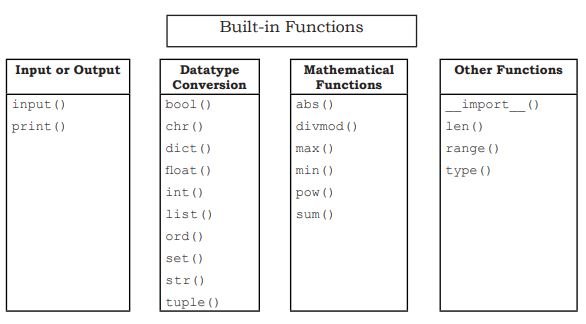
Following is a categorised list of some of the frequently used built-in functions in Python:
|
Function Syntax |
Arguments |
Returns |
Example Output |
|
abs(x) |
x may be an integer or floating point number |
Absolute value of x |
>>> abs(4) 4 >>> abs(-5.7) 5.7 |
|
divmod(x,y) |
x and y are integers |
A tuple: (quotient, remainder) |
>>> divmod(7,2) (3, 1) >>> divmod(7.5,2) (3.0, 1.5) >>> divmod(-7,2) (-4, 1) |
|
max(sequence) or max(x,y,z,...) |
x,y,z,.. may be integer or floating point number |
Largest number in the sequence/ largest of two or more arguments |
>>> max([1,2,3,4]) 4 >>> max("Sincerity") 'y' #Based on ASCII value >>> max(23,4,56) 56 |
|
min(sequence) or min(x,y,z,...) |
x, y, z,.. may be integer or floating point number |
Smallest number in the sequence/ smallest of two or more arguments |
>>> min([1,2,3,4]) 1 >>> min("Sincerity") 'S' #Uppercase letters have lower ASCII values than lowercase letters. >>> min(23,4,56) 4 |
|
pow(x,y[,z]) |
x, y, z may be integer or floating point number |
xy (x raised to the power y) if z is provided, then: (xy ) % z |
>>> pow(5,2) 25.0 >>> pow(5.3,2.2) 39.2 >>> pow(5,2,4) 1 |
|
sum(x[,num]) |
is a numeric sequence and num is an optional argument |
Sum of all the elements in the sequence from left to right. if given parameter, num is added to the sum |
>>> sum([2,4,7,3]) 16 >>> sum([2,4,7,3],3) 19 >>> sum((52,8,4,2)) 66 |
|
len(x) |
x can be a sequence or a dictionary |
Count of elements in x |
>>> len(“Patience”) 8 >>> len([12,34,98]) 3 >>> len((9,45)) 2 >>>len({1:”Anuj”,2:”Razia”, 3:”Gurpreet”,4:”Sandra”}) 4 |
7.5.2 Module
Other than the built-in functions, the Python standard library also consists of a number of modules. While a function is a grouping of instructions, a module is a grouping of functions. As we know that when a program grows, function is used to simplify the code and to avoid repetition. For a complex problem, it may not be feasible to manage the code in one single file. Then, the program is divided into different parts under different levels, called modules. Also, suppose we have created some functions in a program and we want to reuse them in another program. In that case, we can save those functions under a module and reuse them. A module is created as a python (.py) file containing a collection of function definitions.
To use a module, we need to import the module. Once we import a module, we can directly use all the functions of that module. The syntax of import statement is as follows:
import modulename1 [,modulename2, …]
This gives us access to all the functions in the module(s). To call a function of a module, the function name should be preceded with the name of the module with a dot(.) as a separator.
The syntax is as shown below:
modulename.functionname()
(A) Built-in Modules
Python library has many built-in modules that are really handy to programmers. Let us explore some commonly used modules and the frequently used functions that are found in those modules:
Remember, Python is case sensitive. All the module names are in lowercase.
1. Module name : math
It contains different types of mathematical functions. Most of the functions in this module return a float value. Some of the commonly used functions in math module are given in Table 7.2. In order to use the math module we need to import it using the following statement:
import math
Table 7.2 Commonly used functions in math module
|
Function Syntax |
Arguments |
Returns |
Example Output |
|
math.ceil(x) |
x may be an integer or floating point number |
ceiling value of x |
>>> math.ceil(-9.7) -9 >>> math.ceil (9.7) 10 >>> math.ceil(9) 9 |
|
math.floor(x) |
x may be an integer or floating point number |
floor value of x |
>>> math.floor(-4.5) -5 >>> math.floor(4.5) 4 >>> math.floor(4) 4 |
|
math.fabs(x) |
x may be an integer or floating point number |
absolute value of x |
>>> math.fabs(6.7) 6.7 >>> math.fabs(-6.7) 6.7 >>> math.fabs(-4) 4. |
|
math.factorial(x) |
x is a positive integer |
factorial of x |
>>> math.factorial(5) 120 |
|
math.fmod(x,y) |
x and y may be an integer or floating point number |
x % y with sign of x |
>>> math.fmod(4,4.9) 4.0 >>> math.fmod(4.9,4.9) 0.0 >>> math.fmod(-4.9,2.5) -2.4 >>> math.fmod(4.9,-4.9) 0.0 |
|
math.gcd(x,y) |
x, y are positive integers |
gcd (greatest common divisor) of x and y |
>>> math.gcd(10,2) 2 |
|
math.pow(x,y) |
x, y may be an integer or floating point number |
xy (x raised to the power y) |
>>> math.pow(3,2) 9.0 >>> math.pow(4,2.5) 32.0 >>> math.pow(6.5,2) 42.25 >>> math.pow(5.5,3.2) 233.97 |
|
math.sqrt(x) |
x may be a positive integer or floating point number |
square root of x |
>>> math.sqrt(144) 12.0 >>> math.sqrt(.64) 0.8 |
|
math.sin(x) |
x may be an integer or floating point number in radians |
sine of x in radians |
>>> math.sin(0) 0 >>> math.sin(6) -0.279 |
2. Module name : random
This module contains functions that are used for generating random numbers. Some of the commonly used functions in random module are given in Table 7.3. For using this module, we can import it using the following statement:
import random
Table 7.3 Commonly used functions in random module
|
Function Syntax |
Argument |
Return |
Example Output |
|
random.random() |
No argument (void) |
Random Real Number (float) in the range 0.0 to 1.0 |
>>> random.random() 0.65333522 |
|
random. randint(x,y) |
x, y are integers such that x <= y |
Random integer between x and y |
>>> random.randint(3,7) 4 >>> random.randint(-3,5) 1 >>> random.randint(-5,-3) -5.0 |
|
random. randrange(y) |
y is a positive integer signifying the stop value |
Random integer between 0 and y |
>>> random.randrange(5) 4 |
|
random. randrange(x,y) |
x and y are positive integers signifying the start and stop value |
Random integer between x and y |
>>> random.randrange(2,7) 2 |
3. Module name : statistics
This module provides functions for calculating statistics of numeric (Real-valued) data. Some of the commonly used functions in statistics module are given in Table 7.4. It can be included in the program by using the following statements:
import statistics
Table 7.4 Some of the function available through statistics module
|
Function Syntax |
Argument |
Return |
Example Output |
|
statistics.mean(x) |
x is a numeric sequence |
arithmetic mean |
>>> statistics. mean([11,24,32,45,51]) 32.6 |
|
statistics.median(x) |
x is a numeric sequence |
median (middle value) of x |
>>>statistics. median([11,24,32,45,51]) 32 |
|
statistics.mode(x) |
x is a sequence |
mode (the most repeated value) |
>>> statistics. mode([11,24,11,45,11]) 11 >>> statistics. mode(("red","blue","red")) 'red' |
Note:
>>> help("module")
>>> help("math")
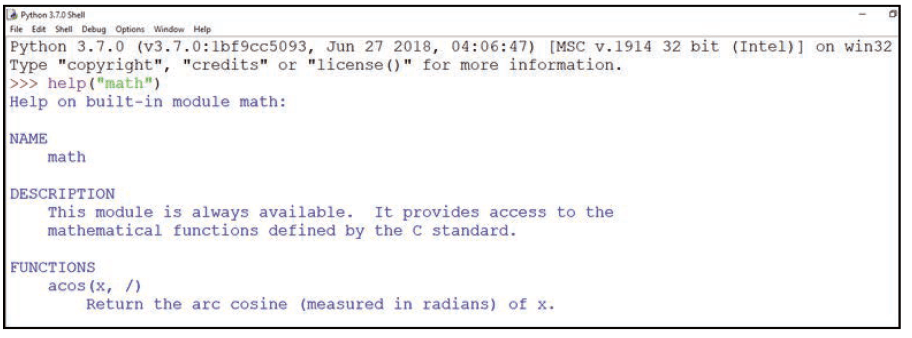
Figure 7.8: Content of module "math"
(B) From Statement
Instead of loading all the functions into memory by importing a module, from statement can be used to access only the required functions from a module. It loads only the specified function(s) instead of all the functions in a module.
Its syntax is
>>> from modulename import functionname [, functionname,...]
To use the function when imported using "from statement" we do not need to precede it with the module name. Rather we can directly call the function as shown in the following examples:
Good Programming Practice: Only using the required function(s) rather than importing a module saves memory.
-
>>> from random import random
>>> random() #Function called without the module name
Output:
0.9796352504608387
Example 7.6
>>> from math import ceil,sqrt
>>> value = ceil(624.7)
>>> sqrt(value)
Output:
25.0
In example 7.2, the ceil value of 624.7 is stored in the variable "value" and then sqrt function is applied on the variable "value". The above example can be rewritten as:
>>> sqrt(ceil(624.7))
The execution of the function sqrt() is dependent on the output of ceil() function.
If we want to extract the integer part of 624.7 (we will use trunc() function from math module), we can use the following statements.
#ceil and sqrt already been imported above
>>> from math import trunc
>>> sqrt(trunc(625.7))
Output:
25.0
A programming statement wherein the functions or expressions are dependent on each other’s execution for achieving an output is termed as composition, here are some other examples of composition:
• a = int(input("First number: "))
• print("Square root of ",a ," = ",math.sqrt(a))
• print(floor(a+(b/c))) • math.sin(float(h)/float(c))
Besides the available modules in Python standard library, we can also create our own module consisting of our own functions.
"""Docstrings""" is also called Python documentation strings. It is a multiline comment that is added to describe the modules, functions, etc. They are typically added as the first line, using 3 double quotes.
#The requirement is:
#1. Write a docstring describing the module.
#2. Write user defined functions as per the specification.
#3. Save the file.
#4. Import at shell prompt and execute the functions.
"""
basic_math Module
*******************
This module contains basic arithmetic operations that can be carried out on numbers
"""
#Beginning of module
def addnum(x,y):
return(x + y)
def subnum(x,y):
return(x - y)
def multnum(x,y):
return(x * y)
def divnum(x,y):
if y == 0:
print ("Division by Zero Error")
else:
return (x/y) #End of module
Output:
#Statements for using module basic_math
>>> import basic_math
#Display descriptions of the said module
>>> print(basic_math.__doc__)
basic_math Module
*******************
This module contains basic arithmetic operations that can be carried out on numbers
>>> a = basic_math.addnum(2,5) #Call addnum() function of the
>>> a #basic_math module
7
>>> a = basic_math.subnum(2,5) #Call subnum() function of the
>>> a #basic_ math module
-3
>>> a = basic_math.multnum(2,5) #Call multnum() function of the
>>> a #basic_math module
10
>>> a = basic_math.divnum(2,5) #Call divnum() function of the
>>> a #basic_math module
0.4
>>> a = basic_math.divnum(2,0) #Call divnum() function of the
Zero Divide Error #basic_math module
__doc__ variable stores the docstring. To display docstring of a module we need to import the module and type the following:
print(<modulename>.__doc__) #__ are 2 underscore without space
Summary
• In programming, functions are used to achieve modularity and reusability.
• Function can be defined as a named group of instructions that are executed when the function is invoked or called by its name. Programmers can write their own functions known as user defined functions.
• The Python interpreter has a number of functions built into it. These are the functions that are frequently used in a Python program. Such functions are known as built-in functions.
• An argument is a value passed to the function during function call which is received in a parameter defined in function header.
• Python allows assigning a default value to the parameter.
• A function returns value(s) to the calling function using return statement.
• Multiple values in Python are returned through a Tuple.
• Flow of execution can be defined as the order in which the statements in a program are executed.
• The part of the program where a variable is accessible is defined as the scope of the variable.
• A variable that is defined outside any particular function or block is known as a global variable. It can be accessed anywhere in the program.
• A variable that is defined inside any function or block is known as a local variable. It can be accessed only in the function or block where it is defined. It exists only till the function executes or remains active.
• The Python standard library is an extensive collection of functions and modules that help the programmer in the faster development of programs.
• A module is a Python file that contains definitions of multiple functions.
• A module can be imported in a program using import statement.
• Irrespective of the number of times a module is imported, it is loaded only once.
• To import specific functions in a program from a
module, from statement can be used.
Exercise
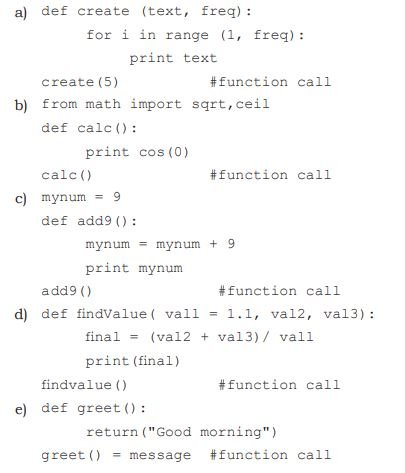
1. Observe the following programs carefully, and identify the error:
2. How is math.ceil(89.7) different from math.floor (89.7)?
3. Out of random() and randint(), which function should we use to generate random numbers between 1 and 5. Justify.
4. How is built-in function pow() function different from function math.pow() ? Explain with an example.
5. Using an example show how a function in Python can return multiple values.
6. Differentiate between following with the help of an example: a) Argument and Parameter b) Global and Local variable
7. Does a function always return a value? Explain with
an example.
Activity-based Questions
Note: Writing a program implies:
• Adding comments as part of documentation
• Writing function definition
• Executing the function through a function call
1. To secure your account, whether it be an email, online bank account or any other account, it is important that we use authentication. Use your programming expertise to create a program using user defined function named login that accepts userid and password as parameters (login(uid,pwd)) that displays a message “account blocked” in case of three wrong attempts. The login is successful if the user enters user ID as "ADMIN" and password as "St0rE@1". On successful login, display a message “login successful”.
2. XYZ store plans to give festival discount to its customers. The store management has decided to give discount on the following criteria:
|
Shopping Amount |
Discount Offered |
|
>=500 and <1000 |
5% |
|
>=1000 and <2000 |
8% |
|
>=2000 |
10% |
An additional discount of 5% is given to customers who are the members of the store. Create a program using user defined function that accepts the shopping amount as a parameter and calculates discount and net amount payable on the basis of the following conditions:
Net Payable Amount = Total Shopping Amount – Discount.
3. ‘Play and learn’ strategy helps toddlers understand
concepts in a fun way. Being a senior student you
have taken responsibility to develop a program using
user defined functions to help children master two
and three-letter words using English alphabets and
addition of single digit numbers. Make sure that you
perform a careful analysis of the type of questions
that can be included as per the age and curriculum.
4. Take a look at the series below:
1, 1, 2, 3, 5, 8, 13, 21, 34, 55…
To form the pattern, start by writing 1 and 1.
Add them together to get 2. Add the last two
numbers: 1+2 = 3.Continue adding the previous
two numbers to find the next number in the series.
These numbers make up the famed Fibonacci
sequence: previous two numbers are added to get
the immediate new number.
5. Create a menu driven program using user defined functions to implement a calculator that performs the following:
a) Basic arithmetic operations(+,-,*,/)
b) log10(x),sin(x),cos(x)
Suggested Lab. Exercises
1. Write a program to check the divisibility of a number by 7 that is passed as a parameter to the user defined function.
2. Write a program that uses a user defined function that accepts name and gender (as M for Male, F for Female) and prefixes Mr/Ms on the basis of the gender.
3. Write a program that has a user defined function to accept the coefficients of a quadratic equation in variables and calculates its determinant. For example : if the coefficients are stored in the variables a,b,c then calculate determinant as b2-4ac. Write the appropriate condition to check determinants on positive, zero and negative and output appropriate result.
4. ABC School has allotted unique token IDs from (1 to 600) to all the parents for facilitating a lucky draw on the day of their Annual day function. The winner would receive a special prize. Write a program using Python that helps to automate the task.(Hint: use random module)
5. Write a program that implements a user defined
function that accepts Principal Amount, Rate,
Time, Number of Times the interest is compounded
to calculate and displays compound interest.(Hint: CI=P*(1+r/n)nt)
6. Write a program that has a user defined function to accept 2 numbers as parameters, if number 1 is less than number 2 then numbers are swapped and returned, i.e., number 2 is returned in place of number1 and number 1 is reformed in place of number 2, otherwise the same order is returned.
7. Write a program that contains user defined functions to calculate area, perimeter or surface area whichever is applicable for various shapes like square, rectangle, triangle, circle and cylinder. The user defined functions should accept the values for calculation as parameters and the calculated value should be returned. Import the module and use the appropriate functions.
8. Write a program that creates a GK quiz consisting of any five questions of your choice. The questions should be displayed randomly. Create a user defined function score() to calculate the score of the quiz and another user defined function remark (scorevalue) that accepts the final score to display remarks as follows:
|
Marks |
Remarks |
|
5 |
Outstanding |
|
4 |
Excellent |
|
3 |
Good |
|
2 |
Read more to score more |
|
1 |
Needs to take interest |
|
0 |
General knowledge will always help you. Take it seriously. |
Case Study-based Question
For the SMIS system extended in Chapter 6 let us do the following:
1. 7.1 Convert all the functionality in Chapter 5 and 6 using user defined functions.
2. 7.2 Add another user defined function to the above menu to check if the student has short attendance or not. The function should accept total number of working days in a month and check if the student is a defaulter by calculating his or her attendance using the formula: Count of days the student was present or the total number of working days. In case the attendance calculated is less than 78%, the function should return 1 indicating short attendance otherwise the function should return 0 indicating attendance is not short.
Let’s peer review the case studies of others based on the parameters given under “DOCUMENTATION TIPS” at the end of Chapter 5 and provide a feedback to them.